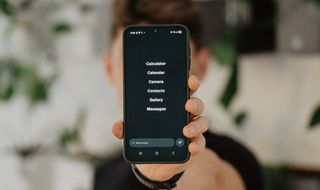
Balance OS is the software that makes a Balance Phone a Balance Phone.
Social media, games, gambling, streaming and adult content are blocked. WhatsApp, banking, maps and Spotify keep working.
You can now buy that software on its own for €79 a year and put it on a Samsung you already own. Same number. Same handset.
It’s the cheapest way into Balance, and it’s the one most people should look at first. And it works worldwide.
In this post
Who Balance OS is for
If you already own a Samsung, this is the cheap way to try Balance. €79 for a year instead of €449 for a new phone. If it doesn’t suit you, you cancel and you’re out a year’s subscription rather than the price of a new phone.
Three groups it fits well:
Parents whose teenager already has a Samsung. You don’t buy them a second phone. You put Balance OS on the one they have, and social media, games and adult content stop working on it. They can’t switch it off.
People who have already tried Screen Time, app timers and deleting apps, and gone back every time. Balance OS can’t be turned off from the phone. There is no "ignore for today".
People who like their current phone. You keep the camera and the battery you already paid for.
Save €10 on Balance OS
Use promo code WHATIFIDIDNT10 at checkout for €10 (£9) off your subscription.
What Balance OS blocks (and what still works)
Balance blocks by category rather than by app. If something is designed to be scrolled with no end to it, it’s out.
| Blocked | Still works |
|---|---|
| Instagram, TikTok, Facebook, Snapchat, X/Twitter | WhatsApp, Messenger, Telegram, Signal |
| YouTube, Netflix, Disney+, Twitch | Spotify, Apple Music, YouTube Music |
| Mobile games, all of them | Google Maps, Waze, Uber, Citymapper |
| Betting and gambling apps | Gmail, Outlook, Teams, Slack |
| Dating apps (Tinder, Hinge, Bumble) | Banking apps, Revolut, Monzo |
| Adult sites, Reddit, most forums | Booking, Trainline, Ryanair, Google Classroom |
The browser works, with the same rules applied. Typing instagram.com into Chrome gets you nowhere.
Calls, texts, camera, alarm and everything else on the phone carry on as normal.
How Balance OS gets on your Samsung
You don’t install anything yourself and you don’t need a computer.
Three steps:
- Buy the subscription and give them your phone’s IMEI number. That’s the serial number of your current phone. You find it in Settings, then About phone.
- They set your phone up on their system. This takes 24 to 48 hours.
- You reset the phone, and Balance OS loads itself during setup.
The reset wipes the phone, so back up your photos and anything else you care about first.
It works anywhere in the world. Nothing gets posted to you, so there’s no shipping fee, no import duty and no two-week wait. It’s live on your phone within 48 hours of buying it.
Compatibility and Support
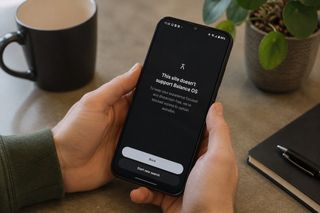
Balance OS is works on Samsung phones only.
If you have an iPhone, Google Pixel, or OnePlus and want Balance OS, you will need to upgrade to a Balance Phone (or Balance Phone Pro).
Most Samsung phones sold since around 2019 are supported, including the Galaxy A, S, M and Z ranges, and the newer Galaxy Tabs.
The full list is on the compatible devices page. Check yours before you pay.
(Refurbished phones sometimes don’t qualify.)
Balance OS vs buying the Balance Phone
The software is identical. What changes is what you pay and what you end up with.
| Balance OS | Balance Phone | |
|---|---|---|
| Price | £79 / €79 / $99 a year | £429 / €449, paid once |
| Phone | The Samsung you own | Samsung Galaxy A37, included |
| Where you can get it | Worldwide | Worldwide |
| Delivery | Active in 24 to 48 hours | £10 to €18 shipping, up to 10 days |
| How long it lasts | While you keep paying | Life of the phone |
| Moving to a new phone | Transfer it yourself | Buy another one |
At €79 a year it takes more than five years to match the €449 you’d spend on the phone. Under five years, the subscription is cheaper.
The other advantage is the hardware.
The Balance Phone is built on the A37, which is a mid-range model. If you own an S24 or an S25, Balance OS gives you the same blocking on a much better phone. And if you change Samsungs, you move the subscription across.
Delivery is the other one. Balance OS gets activated on your phone remotely. Nothing arrives in the post, so you skip the shipping cost and the wait.
Buying the phone outright still wins in two cases: you don’t own a Samsung, or you want to pay once and never think about it again.
My full Balance Phone review covers that side.
What Balance OS can’t do
You can’t choose what gets blocked. It’s all six categories (social media, video streaming, online gaming, gambling, pornography and dating apps) or nothing. Some people find that heavy-handed, and the blocking catches things like image search and a few news sites.
You can’t remove it yourself. To get your normal phone and OS back, you need to contact Balance. Then they release the device and you reset it. That wipes everything again.
It stops when the subscription stops. Miss a payment and the protection goes. Paying every year is a real downside, though for some people the yearly renewal is a useful moment to check whether they want to stick around or try something else.
No monthly option. It’s yearly only. There is a 14-day money-back window, so you get two weeks to decide.
Verdict: is Balance OS worth it?
If you own a compatible Samsung, this is the sensible way to try Balance. €79 to find out whether a locked-down phone actually works for you, without spending €449 to find out.
The subscription is the weak point. You’re renting something you can’t switch off, and if you stop paying it goes away. Over five or six years you’d have been better off buying the phone.
Get it if...
You already own a Samsung from the last few years
Screen Time and app blockers haven’t worked for you
You want to lock down a teenager’s existing phone
You need WhatsApp, banking and maps to keep working
Think twice if...
You have an iPhone or a Pixel, it won’t work at all
You want to pay once and be done, buy the phone instead
You need one blocked app for work, get an NFC tag instead
Get Balance OS
Balance OS is only sold at thebalancephone.com. Use code WHATIFIDIDNT10 for €10 (£9) off.
Get Balance OS
FAQ
What is Balance OS?
Balance OS is a custom version of Android that blocks social media, games, gambling, streaming, dating apps and adult content on a Samsung phone. It’s the same software that comes on the Balance Phone, sold separately as a €79 a year subscription for a Samsung you already own.
Does Balance OS work on iPhone?
No. Balance OS is for Samsung phones only. There is no iPhone version and none has been announced.
Does Balance OS work on a Google Pixel?
No. Samsung only, including the Galaxy A, S, M, Z, XCover and Tab ranges.
How much does Balance OS cost?
£79 / €79 / $99 per year. Yearly only, with a 14-day money-back guarantee. Code WHATIFIDIDNT10 takes €10 (or £9) off.
How do I remove Balance OS?
Contact Balance and ask them to release your device, then reset the phone. It wipes your data, so back up first. You can’t remove it from the phone on your own.
Can you get around the blocks?
No. It runs underneath your apps and puts itself back if anything interferes with it. Safe mode and a plain factory reset don’t help.
Does WhatsApp work on Balance OS?
Yes. WhatsApp, Messenger, Telegram and Signal all work, including group chats and video calls.
Is Balance OS good for a teenager’s phone?
Yes, and it’s one of the main reasons people buy it. It removes social media, games and adult content from a phone they already have, and they can’t switch it back on. It also works alongside Google Family Link if you want location sharing and time limits on top.
What are the alternatives to Balance OS?
If you don’t have a Samsung, you’re looking at a different phone rather than different software. The Light Phone, Wisephone and Mudita Kompakt are the main ones. Here’s the full list of the best dumb phones.
📸 Photos courtesy of Jakub Wittka, jakubwittka.com.
(Copyright whatifididnt. All rights reserved. Unauthorized use prohibited.)