
The Wisephone 2 is a smart minimalist phone that’s free of clutter and distractions. It’s a great alternative to the Light Phone and old-school feature phones.
In this post, we’ll break down exactly what makes the Wisephone 2 stand out and whether it’s the right fit for you.
In this post
What is the Wisephone 2
The Wisephone 2 is a phone designed to cut out distractions and help you get your life back. Techless, the company that makes it, calls it the World’s Healthiest Smartphone.
It’s built on a Samsung A17 5G, but what makes it special is its custom operating system. There’s no email, no browser, and no social media apps (more on that in the next section).
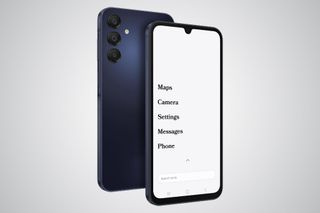
On the homescreen, there are no icons and no colors. Just clean lines of text on a plain off-white background.
Icons and colors are addictive. They are designed to pull your attention. Text doesn’t have this effect, meaning you can be more intentional about how you use your phone, ie., what apps you open and when.
This clever design turns your phone into a tool rather than a constant source of distraction, kind of like what Brick and Unpluq do, but in a more restrictive (and foolproof) way.
Quick Specs:
-
Price: $399 + $39 activation fee
-
Size: 160.1mm x 76.8mm x 8.4mm
-
Memory: 128GB w/ 6GB Ram + MicroSD slot
-
Camera: 50MP
-
Charging port: USB-C
-
Headphone jack: Yes
-
Availability: U.S. only
Apps: What can the Wisephone do (and not do)?
On the Wisephone, "apps" are "tools", and the app store is called the Tool Drawer.
You won’t find Instagram, Amazon, or Gmail in the Tool Drawer. Techless is intentional about filtering out distracting and addictive apps. Wise OS was designed to provide a healthy phone experience. According to Techless, these apps aren’t.
What other apps will you not find on a Wisephone? Here’s a non-exhaustive list.
- ❌ Browsers (Google Chrome, Safari, Firefox)
- ❌ AI (ChatGPT, Claud, Gemini)
- ❌ Email (Gmail, Outlook, Yahoo Mail)
- ❌ Video Streaming (Netflix, YouTube, Hulu)
- ❌ Social Media (Facebook, Instagram, TikTok)
- ❌ E-commerce (Amazon, eBay, Etsy)
- ❌ Dating (Tinder, Bumble, Hinge)
- ❌ Gaming (Candy Crush, Royal Match, Roblox)
You’ll have access to pretty much anything else:
- ✅ Banking & Payments (Cash App, Venmo, Wells Fargo, Capital One)
- ✅ Messaging (Slack, WhatsApp, Signal)
- ✅ Ride Sharing (Uber, Lyft)
- ✅ Food Delivery (Grubhub, DoorDash)
- ✅ Navigation (Waze)
- ✅ Login and Security (1Password, Google Authentificator)
- ✅ Productivity (Google Calendar, Microsoft Teams, Notion, Todoist)
- ✅ Music and Podcasts (Spotify, OmniPod, Pocket Casts)
...and much more. Check out the full list of apps available in the Tool Drawer.
If you don’t find your favorite apps in the Tool Drawer, You can request them from your Wisephone’s settings or via this form.
The Techless team reviews every single request manually. They vet each app per the Healthy Tech Index. If it passes, it gets added. That’s why you’ll find niche apps in the Tool Drawer, like GuitarTuna or Lake Michigan Credit Union.
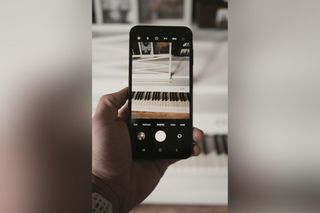
The Camera app on the Wisephone 2
The Healthy Tech Index
How does Techless decide which apps belong on the Wisephone? They rely on their proprietary system, the Healthy Tech Index—a set of 10 criteria that evaluate an app’s overall "healthiness."
Apps that score poorly on the Healthy Tech Index, such as social media apps, aren’t included in the Tool Drawer.
Techless has already reviewed and added many popular apps. But if there’s an app you use that isn’t in the Tool Drawer, you can request Techless to review and potentially add it by filling out this form.
- Competes with or try to set the user’s core values and priorities?
- Encourages an unhealthy focus on success, appearance, or materialism?
- Promotes content that encourages disrespect or trivializes important societal beliefs or principles?
- Hinders the user’s ability to rest and maintain a healthy digital life balance?
- Encourages disrespect for family relationships and societal structures?
- Glorifies violence, hatred, or harm to others?
- Exposes the user to inappropriate content or tempts them towards harmful behavior?
- Encourages dishonesty, cheating, or unethical practices?
- Encourages spreading misinformation or engaging in harmful gossip?
- Fosters envy or dissatisfaction with the user’s life?
I like that Techless acts as a guardian of online privacy and mental clarity. They do the research most of us don’t bother with, like reading Terms and Conditions and Privacy Policies.
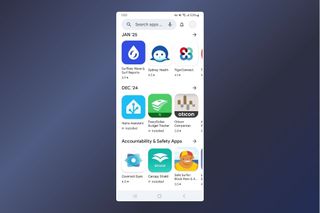
The Tool Drawer
How does the Wisephone 2 compare to other minimalist phones?
If you’re reading this, you’ve probably already looked at the Light Phone 2 and the Mudita Kompakt. They’re the three phones that come up in almost every conversation about stepping back from a smartphone. They share the same goal but take very different approaches to it. Here’s how they stack up.
| Wisephone 2 | Light Phone 2 | Mudita Kompakt | |
|---|---|---|---|
| Price | $399 ($354 with code WHATIFIDIDNT) | $299 | $399 + potential import duties |
| Display | 6.5" color AMOLED | 3.8" e-ink | 4.3" e-ink |
| Camera | 50MP | None | 8MP |
| Battery | 5000 mAh, ~2 days | 950 mAh, 1-2 days | 3300 mAh, up to 6 days |
| Yes | No | Sideload only | |
| App access | 300+ curated apps via Tool Drawer | ~10 built-in tools, no third-party apps | Built-in tools only, sideloading possible but unsupported |
| Monthly fee | $14.99/month (see next section) | None | None |
| Size | 160 x 77mm (smartphone-sized) | 96 x 56mm (credit card-sized) | 128 x 70mm (compact) |
| Availability | US (Canada and AU on waitlist) | Worldwide | Worldwide (ships from Europe, buyer pays customs) |
| Returns | 14 days | 30 days (unopened) | 14 days (must ship back to Poland) |
| Software updates | Ongoing via Techless | Ongoing via Light | 5 years guaranteed |
Which one is right for you?
The three phones are solving different problems, and picking the wrong one is an expensive mistake.
Choose the Wisephone 2 if you still need certain apps in your daily life. WhatsApp to stay in touch, Spotify for music, your bank app, that kind of thing. The Wisephone is a normal Samsung smartphone, which makes the phone a lot more familiar and the switch easier. Just keep in mind there’s a $14.99/month fee on top of the upfront cost.
Choose the Light Phone 2 if you want to dumb down all the way. This phone has no camera, no third-party apps, and a tiny screen that looks like paper. People who love it really love it. People who find it too limiting tend to go back to their smartphone pretty quickly. At $299, it’s the cheapest of the three.
Choose the Mudita Kompakt if battery life is your priority. It lasts up to six days on a single charge, which is honestly impressive. The trade-off is that the e-Ink display makes everything slower, and third-party apps have to be side-loaded. US buyers also need to factor in import fees on top of the $399 price, and returns have to be shipped back to Poland.
Not sure which one to choose? Our full roundup of the best minimalist phones covers more options across every use case and budget.
Get your Wisephone 2 and save $45 with code WHATIFIDIDNT
Pricing: how much does the Wisephone 2 really cost?
The Wisephone costs $399 (or $354 when you use coupon code whatifididnt), plus a one-time $39 activation fee, and there’s an additional subscription you can get to unlock more features. More on that in a moment.
Out of the box, you get the Basic Experience.
You’ll be able to make phone calls, send and receive texts, and use the camera. This is the ultimate Dumb Phone experience. You will have a smartphone that’s beautiful, works fast, and is distraction-free.
Some of you may prefer a bit more functionality. For that, you’ll have to pay a $14.99/month subscription. This will give you access to more apps.
With the subscription, you get access to the phone’s Essential Tools. These include Music, a Calendar, a Calculator, a Voice Recorder, Notes, and Two-Factor Authentication.
Plus, you unlock the Tool Drawer, ie. Techless’s proprietary app store. The Tool Drawer has 300+ third-party apps like WhatsApp, Cash App, Spotify, and many more.
Why the subscription? Here’s from Techless:
“Unlike typical smartphone features, the subscription isn’t just about providing tools—it’s about delivering robust security, a distraction-free environment, and access to a carefully curated selection of vetted third-party apps. The Essential Toolset and optional Custom Tool Drawer run on top of our advanced safety framework. “
At $354 (after our reader discount), it’s cheaper than most flagship phones and it won’t hijack your attention or your kids'. Get yours at wisephone.com with code WHATIFIDIDNT.
How does it work: Essential vs Expanded Experience
When you first power on your Wisephone 2, you’ll need to choose between two modes: Essential Experience or Expanded Experience. (You can switch modes later if you change your mind.)
Initially, I wondered if the Expanded Experience was a paid add-on. It’s not. Both modes are included in the $14.99/month subscription.
Your choice depends on personal preference and how you plan to use the phone.
The Essential Experience
In this mode, you get access to the default apps along with a handful of third-party apps. But you cannot install other third-party apps from the Tool Drawer.
Apps in the Essential Experience: Music, Calculator, Maps, Phone, Messages, Camera, Flashlight, Photos, Clock, Notes, Two-Factor Auth, Calendar, LocalSend, SmartSwitch, Waze, Google Drive, and Life360.
This mode is ideal for children and the elderly who don’t need "smart" features. It’s also perfect for anyone who gets easily distracted and wants a simpler, more minimal phone experience.
The Expanded Experience
In this mode, you can access the Tool Drawer and install third-party apps like Uber, Venmo, and Airbnb (full list here).
This mode is great if you need more functionality for your everyday life.
For more information and tutorials on setting up your Wisephone 2, check out the company’s support page.
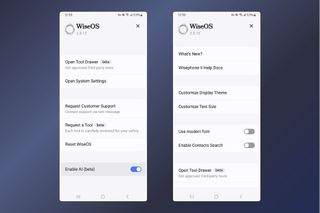
The Settings app - clean and minimalist, too.
Carrier Plans and Cellular Coverage
You can use the Wisephone 2 with your carrier or use one of Techless’s cellular plans. All plans allow you to keep your current phone number.
Techless offers 3 plans. All plans include the Techless subscription.
| Plan | Price (per month) | Data | Calling & Texting | Mobile Hotspot |
|---|---|---|---|---|
| Minimal | $24.99 | 1GB | Unlimited | No |
| Healthy | $44.99 | 5GB | Unlimited | No |
| Pro | $69.99 | 50GB | Unlimited | Yes |
Bottom line: Who’s the Wisephone For?
The Wisephone 2 is designed for anyone craving a simpler, more intentional way to use their phone—free from unnecessary distractions. It’s practical, straightforward, and fits beautifully into different lifestyles:
A lot of people who try Wisephone end up reflecting more on their habits. If you’re curious what this kind of shift can actually feel like, here’s what I learned from spending 30 days without modern tech.
👉 For digital wellbeing: If you’re tired of spending too much time glued to your phone, constantly distracted, or struggling to stay focused, the Wisephone 2 helps you regain control. It gives you what you need and cuts out what you don’t.
👉 For kids: It’s a great option for children who need a phone to stay in touch, without the constant pull of social media, games, or endless apps. Just enough functionality to stay connected—nothing more.
👉 For mums: Whether you’re managing a busy household or juggling work and family life, the Wisephone 2 keeps you reachable without pulling you into the endless cycle of notifications and scrolling.
👉 For the elderly: Its simplicity makes it a perfect choice for older relatives. It’s easy to use and doesn’t overwhelm them with unnecessary features, while still helping them stay connected.
The Wisephone 2 isn’t for everyone. If you rely on your phone for constant access to email, web browsing, and content discovery, this probably won’t suit your needs. It’s built for simplicity, not for tech enthusiasts or people looking for the latest high-end smartphone experience.
It pairs well with other physical tools like phone lock boxes if you want to keep things out of sight at home or during deep work.
Get your Wisephone 2 today
The Wisephone 2 is exclusively available at wisephone.com. Get yours today and save $45 with promo code WHATIFIDIDNT.
Let’s do this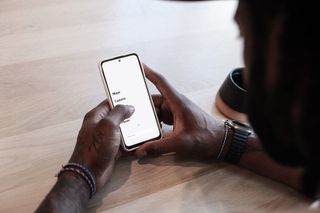
Why Screen Time probably isn’t working for you
If you’ve landed on this page, there’s a good chance you’ve already tried Screen Time. Most people have. You set a limit, felt good about it, and then tapped "Ignore for today" the moment it got in the way.
The core issue is that Screen Time was built to feel like control without actually removing access. It works on the honor system, and the honor system falls apart under pressure.
Screen Time puts the lock and the key on the same device.
At the exact moment your resistance is lowest, your phone offers you a one-tap way out.
- Limits reset after iOS updates.
- Kids figure out that changing the system clock bypasses Downtime.
- Parents discover that some restrictions don’t even require the Screen Time PIN to change.
Reddit threads documenting these workarounds have been running since 2022 and are still being updated in 2026.
The Wisephone takes a different approach.
There’s no "Ignore for today" because there’s no limit to ignore. Instagram simply doesn’t exist on the device. There’s no browser. No games.
The boundaries are baked into the operating system, not layered on top of it as settings you can undo.
It’s a harder commitment than a Screen Time limit. That’s also exactly why it works.
FAQ
Does the Wisephone have WhatsApp?
Yes. WhatsApp is available in the Tool Drawer and works normally on the Wisephone 2. It’s one of the most common reasons people choose it over phones like the Light Phone 2, which doesn’t support WhatsApp at all.
Does the Wisephone have Spotify?
Yes. Spotify is available in the Tool Drawer. You can stream music and podcasts as you normally would.
Does the Wisephone have email?
No, and that’s by design. Gmail, Outlook, and other email apps are not available on the Wisephone. Techless considers email a source of constant distraction and has left it out intentionally. If email on your phone is non-negotiable, the Wisephone probably isn’t the right fit.
How much does the Wisephone subscription cost?
The subscription costs $14.99 per month. You need it to access the Tool Drawer and install third-party apps like WhatsApp, Spotify, and banking apps. Without it, the phone is limited to the basics: calls, texts, camera, maps, and a handful of built-in tools.
Techless also offers bundled carrier plans starting at $24.99 per month, which include the subscription. (see Pricing section)
Is the Wisephone available in Canada?
Not yet. But it’s next in line. Techless even has a dedicated Canadian compliance page on their site. But international shipping isn’t available at the time of writing. You can join the waitlist on wisephone.com to be notified when it launches there.
Is the Wisephone available in Australia?
Techless doesn’t ship to Australia at the moment. Australia is on their expansion roadmap but no launch date has been announced. You can join the waitlist directly on wisephone.com to get notified when that changes.
How good is the Wisephone 2 camera?
It’s a proper 50MP camera, which is genuinely good for a phone in this category. It handles everyday photos, document scanning, and check deposits without any issues. It won’t compete with a flagship iPhone, but it’s a long way from the basic cameras you’d find on a flip phone or the Light Phone 2, which has no camera at all.
What is the return policy for Wisephone?
You can return the Wisephone within 14 days of receiving it, as long as it’s in pristine condition. Given the price, it’s worth being sure before you commit.
Can you import contacts and photos from another phone?
Yes. Techless has a step-by-step guide for transferring contacts and photos from both iPhone and Android. You can find it on their support page at wisephone.com.
Can you track a Wisephone?
Yes. The Wisephone 2 comes with Life360 for location sharing.
As far as parental control goes, the Wisephone 2 also has a newly launched Portal that lets you manage additional Wisephone devices remotely. From there you can control which apps are installed on each device and toggle individual features on or off, handy if you want to disable the hotspot or Tool Drawer on your kid’s phone.
Is there a Wisephone discount code?
Yes. Use code WHATIFIDIDNT at checkout on wisephone.com to get $45 off the Wisephone 2. That brings the price down from $399 to $354. The code is exclusive to this site and works directly on their checkout page. The Wisephone is not sold on Amazon.