
A phone lock box is a commitment device that lets you lock your phone away. Some come with a timer, some don’t.
In this post, I compare the 5 best phone lock boxes, from a simple $30 timed box for a single phone to a signal-blocking tray for the whole family. You’ll see what each one costs, how it locks, and who it’s for.
In this post
What Is a Phone Lock Box?
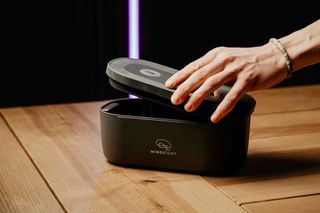
A phone lock box is exactly what it sounds like: a box that locks your phone away so you can’t use it. You drop your phone in, lock it, and get your time and focus back.
Unlike screen time apps, which are easy to bypass, a phone lock box forces commitment. It is a tangible and once your phone is in, it’s in. Out of sight and out of mind.
If your screen time is more than a couple of hours per day, a phone lock box is a drastic and effective way to break your bad phone habits and get your time back.
Before you buy: Make sure to check out these screen time hacks. These tips work great on their own, but even better when paired with a lock box.
How I Chose These Lock Boxes
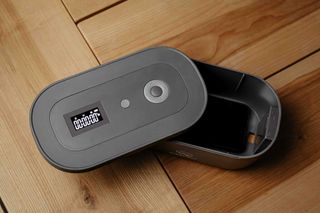
I own the larger Mindsight Lock Box, so that’s the one I know first-hand. Everything I say about how it works comes from using it.
For the rest, I spent hours digging through forums, social media threads, and product reviews. I wanted to know what people really think of these boxes once they’ve lived with them. What they preferred. What annoyed them.
I also contacted each company for more information.
My goal is to surface the details that are buried in places you might never look, the kind you’d otherwise only find out after buying. Everything on this page is here to help you make the best decision for yourself.
The Best Phone Lock Boxes
I’ve come across lots of interesting products. Some are see-through (kSafe Mini), some block cellular signal (Yondr Home Tray), and some even allow you to interact with your phone while it’s locked (ySkys Locker 01).
Here are the 5 best models:
| Lock box | Price | How it locks | Best for |
|---|---|---|---|
| Mindsight Phone Lock Box | $30 | Timer or code, three modes | One person and one phone |
| kSafe Mini | $59.90 | Timer up to 10 days, no override | See-through box with no way out |
| ySky Locker 01 | $34.99 | Timer up to 99 hours | Emergency calls while locked |
| Lockabox Mini | $34.99 | Three-digit combination | Privacy and keeping a kid’s device secure |
| Yondr Home Tray | $249 | Lid that blocks all signals | Families and workplaces creating phone-free spaces |
Mindsight Phone Lock Box ($30)
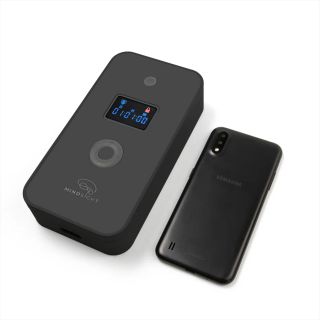
This is Mindsight’s box made for a single phone. It’s smaller and cheaper than their regular Lock Box, which is the one I own.
It’s an opaque box, so you can’t see your phone while it’s locked (less temptation).
It holds one phone in a standard case. XL phones won’t fit. The inside measures 7 x 3.3 x 0.65 inches.
You can set the timer anywhere from 1 minute to 30 days, and it has three different lock modes depending on how strict you want to be with yourself.
The box has a built-in battery that recharges over USB-C. A charging hole lets your phone charge while locked away.
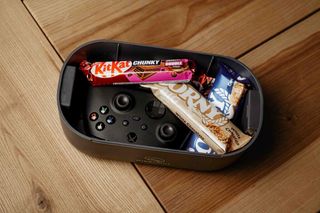
Need more room? The larger Mindsight Lock Box ($40) fits 3 to 4 phones, or other items like game controllers or snacks. Want the details? Read my full Mindsight Lock Box review.
Mindsight also recently released Anchor, an NFC tag. If you’re curious how those work, see my list of the best physical phone blockers.
I reached out to Mindsight and got a deal for readers of this post. Simply use code WHATIFIDIDNT at checkout for 15% off your order.
kSafe Mini ($59.90)
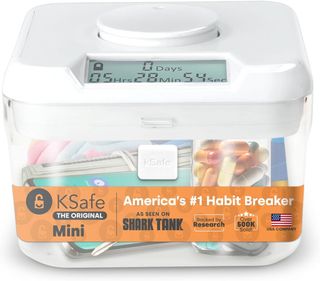
The kSafe Mini gained fame after appearing on Shark Tank in 2014.
This clear container lets you see your phone but not touch it, which some people can find motivating (and others torturous).
The kSafe can lock for up to 10 days and has no built-in overrides. Once it’s locked, you’re committed until the timer ends.
I personally prefer someone that’s not see-through. Being able to see notifications could make it harder to disconnect mentally.
ySky Locker 01 ($34.99)
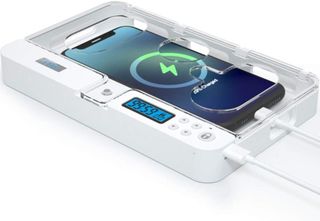
The ySky Locker is a transparent box with a unique feature - small holes that let you make emergency calls or use limited functions while your phone is still locked inside. If you don’t like that, you can set your phone screen down in the box.
It can be set for up to 99 hours and includes a 10-second "hesitation period" if you change your mind (a common feature on most lock boxes).
In my opinion, the holes that let you interact with your phone might defeat the purpose of getting a lock box in the first place, especially for those of you who need stricter boundaries.
Lockabox Mini ($34.99)
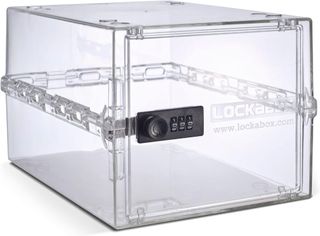
The Lockabox Mini looks like a small safe. It locks with a three-digit combination lock instead of a timer. It’s compact, sturdy, and the perfect size for phones, medication, or snacks.
It’s available in three colors: transparent, black, and white.
Unlike timer-based lock boxes, you can open this one anytime as long as you know the code. That makes it better for privacy than self-discipline.
It’s a great option if you just want your phone out of sight for a while, or need a secure spot for your kid’s device.
It’s made from shatter-resistant polycarbonate and comes fully assembled. The box includes 11 small cable holes (four on each side and three at the back), so you can run charging cables through while it’s locked.
It doesn’t block Wi-Fi or mobile signal.
Yondr Home Tray ($249)
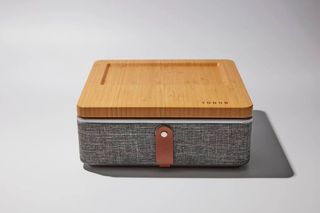
The Yondr Home Tray is a premium option that locks your devices and blocks all signals using a special fabric lining. It blocks 5G, Wi-Fi, cellular signals, Bluetooth, GPS, and RFID when fully closed.
It holds about six smartphones and includes an option to thread charging cords through the back panel.
You cannot charge phones and block signals at the same time. Charging requires the back hatch to remain open. Signal blocking only works when the hatch is fully closed.
Still, it’s a solid choice for families, workplaces, or hotels that want to create phone-free spaces. It also looks great on a shelf.
How Do Phone Lock Boxes Work?
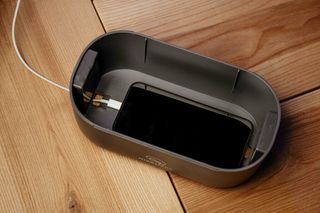
For the sake of simplicity, I’m going to use the larger Mindsight Lock Box (the one I own) as an example, but most lock boxes, including the smaller Phone Lock Box, work more or less the same. (For everything else about it, see my Mindsight Lock Box review.)
1. Add your phone to the box
Open the lid and throw in your phone and any other distractions you want to lock.
2. Set the timer
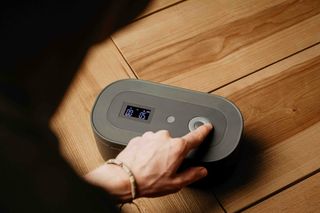
Use the display on top of the lid to set how long you want to lock the box for. You can set days, hours, and minutes. You can lock it for as little as one minute or as long as 30 days.
3. Choose your mode
You can choose how strict you want the locking mechanism to be using the display. The Mindsight lock box has three modes:
🔓 Lockbox-only mode: No timer. This mode locks the box indefinitely. To unlock it, you have to use the unlock code, which is a sequence of keys to press on the display.
⏳ Standard mode: This works with a timer. The box unlocks at the end of the timer. You can open it while it’s locked with a code if you need to.
🏰 Fortress mode: This mode works with a timer, too, but there is no code that unlocks the box. You have to wait for the timer to run out. There’s no to hack your way in (except by breaking it).
4. Confirm and lock
Once you’ve set the timer and chosen your mode, simply press OK. The box will self-lock after 15 seconds.
Get 15% off your lock box today
You can save 15% on any Mindsight lock box by visiting mindsightnow.com and using coupon code WHATIFIDIDNT.
Let’s do this5. unlock the box
There are only two ways to unlock the lock box (three if you consider breaking it):
1. Let the timer run out
2. Use the unlock code (indicated on a label at the bottom of the box)
Note: you won’t be able to use the unlock code if you’ve chosen Fortress mode when locking the box. The only way to unlock the box in Fortress mode is to contact Mindsight and ask them to generate an emergency access code for you.
What happens if the batteries die while the box is locked?
The larger Mindsight Lock Box runs on two AA batteries. If they die while the box is locked, all you have to do is replace them and the timer will resume where it was at when the batteries died.
I tested this by removing the batteries when the box was locked. There was 57 seconds left on the timer. When I pulled them out, the display turned off. When I put them back in, the countdown resumed at 57 seconds.
The smaller Phone Lock Box has a built-in battery that recharges over USB-C, so there are no batteries to replace. I haven’t tested what happens to its timer if it runs flat.
Considerations for Choosing a Lock Box
After using a lock box for a while, here is what I’d recommend paying attention to when choosing your device.
Opaque vs Transparent: Clear boxes let you see your phone, which can make it harder to resist. Opaque ones remove that visual trigger. If you can’t see it, you’re less likely to reach for it.
Size and What You Plan to Lock: Some boxes are big enough for multiple items like phones, remotes, or snacks. Others fit just one phone. Consider what you’ll lock up and how much space you have.
Signal Blocking vs Non-Blocking: A few lock boxes are lined to block Wi-Fi, Bluetooth, GPS, and cell signals. Most do not. I personally don’t need this feature, since setting the phone to Airplane Mode achieves the same result.
Limited Screen Access in Emergencies: Some models like the ySky Locker let you tap or see your screen without unlocking. Handy for emergency use.
Charging Access: Many boxes now offer small slots for charging cables. This lets you power up while your device stays locked. Not all designs support this, so double-check if it matters to you.
Locking Mechanism: Some lock boxes use digital timers. Others rely on simple codes or even just a latch. Decide how much friction you want. More friction usually means more follow-through.
Strictness of the Lock: Some timers allow early unlocking. Others have no override once started. A few offer both options depending on the mode. Choose based on how much self-control you want to outsource.
Bottom Line: Should You Get A Lock Box for Your Smartphone?
...if you want to use your phones less
If you catch yourself doom-scrolling, checking notifications every few minutes, or wasting time on apps you don’t like, a phone lock box will help you break the cycle. Set a timer, lock your phone away, and actually focus on work, reading, or just existing without a screen.
It’s the easiest way to force yourself into better habits. The only thing you have to remember is to put your phone in the damn box.
...if you want to reduce your kids' screen time
If you’re tired of arguing with your kids about screen time, a phone lock box will take the battle out of your hands. Set the timer, lock their devices, and let the box be the bad cop.
The box makes screen-free time easier to enforce and accept.
...if you want to better focus
If you’re studying for exams, writing a paper, or trying to get through a deep work session, locking your phone away removes the temptation completely. You don’t have to rely on self-discipline.
Once you lock your phone up, you will find it easier to get into flow state and do deep work.
...if you want to break habits or addictions
If you have a problem with late-night snacking, vaping, or constantly reaching for your phone out of boredom, a lock box helps put space between impulse and action.
Lock away cigarettes, snacks, video game controllers, or anything else you’re trying to cut back on. And Let the timer force you to pause before acting on a craving.
Phone Lock Box Alternatives
I’ve written about solutions for managing screen time. A lock box is the most committed method and works incredibly well for creating focused time blocks throughout your day.
If you’re looking for something a bit less committed that would still let you use certain features of your phone, consider the following:
-
Dumbed-down iPhone: if you have an iPhone, there are lots of cool hacks you can use to decrease your screen time. I’ve written about my favorites in this guide.
-
NFC-based app blockers: These tools use physical NFC tags to block or unblock access to specific apps on your phone. Two of the most popular and effective products right now are Unpluq and Brick.
-
Distraction-free smartphones: If you can’t trust yourself to put your phone in a box every day, just get one without distractions. There are several options, but my favorite is the Wisephone 2. It’s a full-featured smartphone with no email, social media, browser, games, or porn.
📸 Photos courtesy of Jakub Wittka, jakubwittka.com.
(Copyright whatifididnt. All rights reserved. Unauthorized use prohibited.)