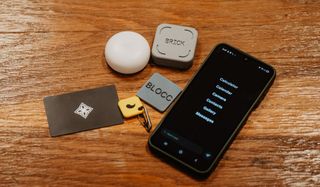
I have been testing different physical app blockers for a couple of years now. And they have become part of my daily routine.
Thanks to them, I can keep my screen time under two hours most days. I find them much more effective than screen time apps (eg. Opal or Apple’s Screen Time). The physical component makes the limits you set for yourself much harder to ignore.
Below I break down each phone blocker: what makes it unique, its pros and and cons, and who I’d recommend it for.
I’ve also included three newer options I have ordered but not tested yet, clearly marked so you know which picks are first-hand and which are not.
Overview
Quick comparison
| Blocker | Price | Format | Best for |
|---|---|---|---|
| Brick | $59 | Magnetic cube | Total lockout |
| Bloom | $39 | Steel card | Quick breaks |
| Unpluq | $26.50 + $77/yr | Keychain tag | Carrying it with you |
| Halo | $49 | Bluetooth pebble | One specific room |
| Autonomous Key | $19 | Key-shaped NFC | AI accountability |
| Scrolly | $45 | NFC token | Playful, gamified |
| Blok | $29 | NFC card or barcode | Flexible triggers |
The best physical phone blockers
1. Brick
Best for strict limits
Availability:
Ships worldwide
Price:
$59
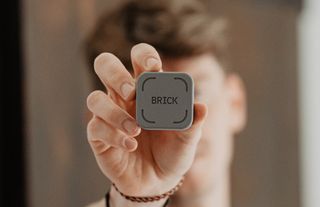
Brick is a small 3D-printed cube with a magnet built in, so it sticks to your fridge or a metal shelf and stays put.
With Brick, you get five emergency unbricks for the entire life of the device. Other devices tend to be a lot more generous than that. That’s Brick’s appeal. Fewer get out of jail cards will force you to take the app and your intentions more seriously.
It also has a Strict Mode that prevents you from deleting the app to lift its restrictions.
My Brick lives on my oven. I’ve set up a 24/7 schedule, so my phone is always Bricked unless I use the device to unlock it. But if you want more flexibility, you can decide to only Brick your phone on certain days or between certain hours.
Brick is designed to stay in place, so it is not the one if you want something portable to carry with you.
A couple other things to note: you need an internet connection to Brick and unbrick, and website blocking does not work on Android at the time of this writing.
Get the Brick or read my full review
2. Bloom Card
Best for timed breaks
Availability:
Ships worldwide
Price:
$39
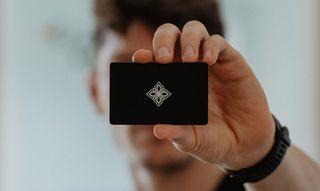
Bloom is a stainless steel NFC card that locks distracting apps. Its whole idea is flexibility.
Instead of locking you out completely, Bloom lets you take three five-minute breaks in a session, and those breaks do not need the card. You take a break, do what you need, and the apps lock again on their own once the five minutes are up.
Bloom has a Strict Mode that stops you from deleting the app to get around it.
I use Bloom most days. The breaks let me post social media content for work or answer a message without having the card nearby.
If I had to name a downside, it is the scanning. It can be finicky. You have to lay the card flat near the selfie camera, and it does not always register on the first try.
Bloom is a thick metal card that might not fit in your wallet. And because the card has no magnet or keychain clip, you have to decide where it lives. Mine is in a drawer at home.
Get the Bloom Card or read my full review
3. Unpluq Tag
Best for carrying your blocker with you
Availability:
Ships worldwide
Price:
$26.50 tag (€20), plus a subscription from $77/year (€69.95)
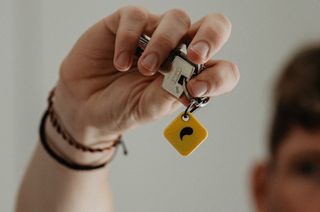
Unpluq is built to be portable. The tag is a small rubberized square with a mini carabiner, made to live on your keys.
So instead of leaving it on a fridge or in a drawer, you carry it with you all day. I keep mine clipped to my house keys.
It also works offline. You can lock and unlock on a plane or somewhere with no signal, which many app blockers cannot do.
The Unpluq app is interesting. On top of the tag, you can unlock apps with a tap pattern, a shake, a scroll, a QR scan, or a set number of steps (Android only). Each method has difficulty levels.
It also has a timed re-lock. Five minutes after you unlock, everything locks again on its own. The duration is customizable.
The catch is the money. The tag is cheap at $26.50, but it only works if you also pay for a plan, which starts at $77 a year. That ongoing cost is the main thing to weigh.
Get Unpluq or read my full review
4. ScreenZen Halo
Best for blocking apps in a particular location
Availability:
US only
Price:
$49
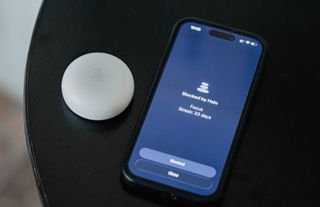
The Halo is not an NFC tag. It is a small Bluetooth pebble that blocks apps automatically when you are within a set radius of it, up to 50 feet.
Walk into the room where your Halo is and your apps lock. Leave and they unlock again.
Mine sits on my nightstand and blocks Instagram and TikTok 24/7. So I have to physically leave my room if I want to scroll.
The Halo works through the ScreenZen app. One Halo can be shared by an entire household.
The Halo is good if you’re trying to stop scrolling in a particular location. The bedroom is one example, but you could also have it in your office to prevent distractions while you work.
The Halo is US-only for now.
Get the Halo or read my full review
5. Autonomous Key
Best for AI-assisted accountability
Availability:
Ships worldwide
Price:
$19
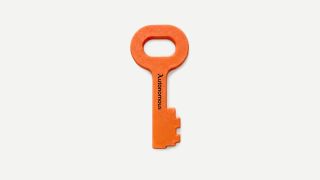
Autonomous Key is a recent Kickstarter launch from Autonomous, the office and standing-desk company that has shipped hardware since 2015.
It is an NFC key. You choose which apps to lock, then scan the key to unlock them. It has no battery to charge.
At $19, it is the cheapest option in this roundup. It comes in a few colors, and you can add your name or a logo for free.
What sets it apart on paper is the software. The app has a feature called Key Intelligence that tracks your unlocking habits.
It logs when and how often you unlock your apps, then surfaces patterns you might not notice, like the time of day you most often cave or how your focus drops off later on. When your unlocks spike, it points that out and nudges you back on track.
Most blockers just lock and unlock. This one also tries to coach the habit.
It is built for your keyring, so you carry it with you instead of leaving it in one spot.
6. Scrolly
Best for a playful, gamified approach
Availability:
Ships worldwide
Price:
$45 (€49.95)
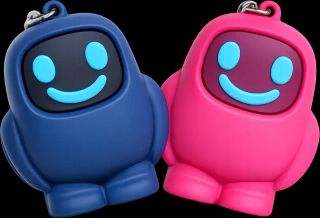
Scrolly is a small NFC tag shaped like a cartoon character, pitched as "your screen time buddy."
You choose which apps and websites to block, then tap the tag to lock or unlock them. The app also has schedules, a strict mode, and usage stats.
What makes it stand out is the gamification. You earn focus coins for time spent off your phone, which feed a rewards system meant to keep the habit fun rather than punishing.
It comes in pink or navy, works on iOS and Android, and has no subscription. There is also a mode for managing a child’s phone.
7. Blok
Best for flexible triggers
Availability:
Ships worldwide
Price:
$29
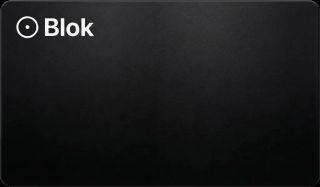
Blok is a phone app paired with a physical NFC card. You tap the card to start a session that blocks your chosen apps and websites, then tap again to end it.
Its standout is barcode support on iOS. Any scannable code can become a key, so a book, a coffee bag, or anything with a barcode can be the thing you scan to unlock. You do not even need the card for it.
The app has a lot of options: modes for work, study, or sleep, scheduled blocks, timed breaks, and a streak counter that shows how long you have kept your apps blocked.
It works on iPhone and Android, though website blocking works better on iPhone.
Which physical phone blocker should you choose?
If you want the short version, here is how I would decide.
- Brick if you want the strictest, simplest option.
- Bloom if you want controlled access with short breaks.
- Autonomous if you want to carry your blocker on your keys.
- Halo if your problem lives in one room, like a bedroom or an office.
Whatever you pick, the mechanism is the same.
You put a real object between yourself and the apps. That half-second of friction is usually enough to break the automatic reach for your phone.
It is the reason any of these beat a software-only app.
📸 Photos by Jakub Wittka, jakubwittka.com.
(Copyright whatifididnt. All rights reserved. Unauthorized use prohibited.)