
The best dumb phones let you call and text without dragging you back into apps all day. They’re phones that are simple and functional, but also make use of the incredible technology that comes with modern phones.
I tested the phones I own and researched the rest. I read user reviews and Reddit threads to see what people like, what annoys them, how each phone holds up once the novelty wears off, and whether the price feels fair for what you get.
Overview
How I reviewed the best phones
I believe switching to a dumb phone shouldn’t feel like a step backwards.
Most of you crave simplicity and peace, but still want to be able to use WhatsApp, take great photos, listen to music, and maybe even send the occasional email.
So for this article, I looked for phones that included basic tools that make daily life easier, like maps or hotspot. Small things that keep you from switching back to your smartphone the moment you need directions or want to scan a QR code.
I included two flip phones, the Sunbeam F1 Pro and the Dumbphone 2, and one budget phone with buttons, the AGM M9. The rest are modern minimalist phones that feel familiar and modern.
If you are not ready to buy a dumb phone, you still have some options. You can turn your iPhone into a dumb phone. Or you can use an NFC app blocker like Brick or Bloom. These give you more control without buying new hardware.
A quick disclaimer:
I own three of the phones in this list: the Wisephone 2, Balance Phone, and Mudita Kompakt. For the others, I relied on research and real user experiences from Reddit. It is one of the few places where people share honest details about what these phones are like to use daily.
Also, if you buy a phone through one of my links, I get a small commission, at no extra cost to you. This helps support this site.
Something I didn’t expect after switching to a dumb phone is how often it starts conversations. When I take out my Mudita Kompakt, people notice it right away. They ask what it is. They ask if they can try it.
Best dumb phones
Here are all ten at a glance:
| Phone | Price | What it is | Where you can get it |
|---|---|---|---|
| Wisephone 2 | $399 + subscription | Text-only smartphone with a curated app store | US |
| Light Phone 3 | $899 | Premium minimalist phone with a few simple tools | US and international |
| Balance Phone | €449 | Samsung phone that blocks social media and games | UK and Europe |
| Punkt MP02 | $299 | Bare-bones phone for calls and texts | US |
| Mudita Kompakt | $399 | E Ink phone with offline maps and a camera | Worldwide |
| Sunbeam F1 Pro | from $359 | Rugged flip phone | US |
| Keyphone | from $399 | Strict bar phone with a swappable keyboard | Worldwide |
| AGM M9 | $49 | Rugged budget phone with buttons | US (T-Mobile) |
| Dumbphone 2 | $20 + monthly plan | Flip phone that syncs with your smartphone | US |
| Sidephone | from $299 | Small modular phone with swappable keypads | International and Canada |
Wisephone 2 ($399)
Best modern minimalist smartphone
Availability:
US only
Price:
399 USD + 39 USD activation fee
Subscription from 14.99 USD/month
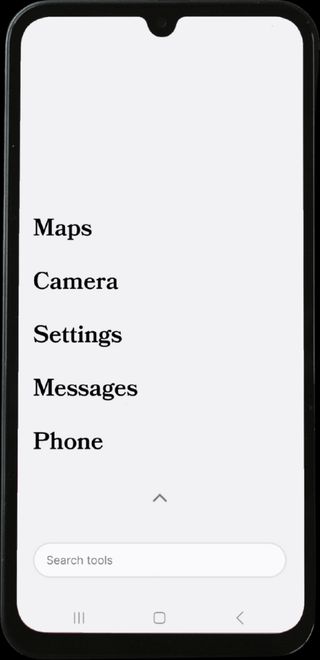
The Wisephone 2 feels like a normal smartphone at first glance, but the experience is very different. The homepage is text only. There are no icons pulling for attention. The whole OS feels calm and you always feel in control using it.
What makes the phone stand out is its app store (called Tool Drawer).
Techless—the company that makes the phone—only approves apps that support a healthier digital life.
You get tools like WhatsApp, Spotify, Waze, Venmo, and most banking apps. But you will not get Instagram, TikTok, YouTube, email, or a browser. There is no way to cheat this.
The Wisephone 2 uses a Samsung A17 5G as its hardware base and runs WiseOS. So you get the reliability of a Samsung device combined with the simplicity of a clean, secure operating system.
Calls and texts work well. Camera is great (50MP). Cellular connectivity too. Every feature you’d expect from a traditional smartphone is there and works flawlessly.
So what’s the catch?
Well, there is a monthly subscription if you want full access to the Tool Drawer. It costs $14.99/month if you keep your own mobile carrier. Or you can take one of Techless’s own carrier plans, which start at $24.99/month with 1GB of data and include the subscription. There is also a one-time $39 activation fee. More on the different pricing plans in our dedicated Wisephone 2 review.
Real world feedback is consistent. People feel less pulled into distractions. Parents like it for kids because there are no loopholes.
If you want a phone that still runs useful apps but removes all the time-wasters, the Wisephone 2 is one of the best fits.
Get the Wisephone 2 or read my full review
Light Phone 3 ($899)
Best dumb phone design
Availability:
Reserve now, delivery in late December
Price:
899 USD
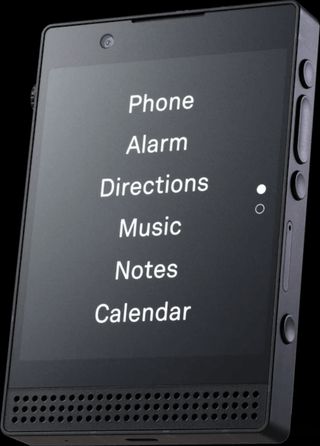
The Light Phone line has a very loyal following. The Light Phone 3 is built around one idea: remove everything that keeps you glued to your screen.
The interface and product design are ultra clean. Simple. Elegant.
It handles calls and texts, plus a set of simple tools: alarm, calculator, calendar, directions, hotspot, music, notes, podcasts, weather, an authenticator, and rideshare (Uber and Lyft).
You can’t use WhatsApp, Signal, Spotify, or tap to pay. There is no browser and no email. The keyboard and interface are English only.
Compared to the older Light Phone 2, which is now sold out, the Light Phone 3 is bigger, faster, and has a better screen. It adds a simple camera and better navigation. It only comes in black.
Now that more people have had it for a while, owner feedback is mixed.
What people love most is what the phone takes away. They say they read more, forget about their phone, and are more present with their family. They also like the calm interface, the build quality, and the camera, which makes taking photos feel more deliberate.
The complaints are consistent too. Typing is the big one. Keys get missed and fixing mistakes is slow. Group chats can get messy after moving over from iMessage, and the photos you send are heavily compressed. Battery life varies a lot. Some people get two days. Others struggle to finish one.
The most serious issue is reliability. Some owners report random restarts, and a few had the phone reset itself and lose their photos and messages. Light has shipped fixes, including one in September 2026, but it is too early to say the problem is gone.
Then there is the price and the wait. At $899, it is the most expensive phone on this list. You can reserve one now, but at the time of this writing, delivery is in late December.
Light also has a cheaper flip phone on the way, the Light Phone Flip ($349). It is on pre-order, and orders placed now are due to ship in May 2027.
Bottom line: Get the Light Phone 3 if calls and texts cover most of what you need and you are happy to do email and banking on a laptop. Skip it if you rely on WhatsApp or Signal, text a lot, or can’t live with the odd glitch.
Balance Phone (€449)
Best dumb phone with email
Availability:
UK and Europe
US and Canada: Pro and Balance OS only
Price:
Balance Phone: €449
Balance Phone Kids: €299
Balance Phone Pro: €749 (798 USD)
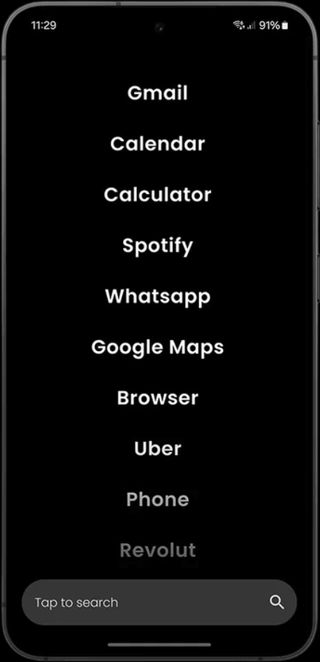
The Balance Phone looks like a normal Samsung device but runs a custom black and white operating system. The idea is simple. You keep all the essential tools. You lose the apps that pull you into scrolling.
Most people describe it as a “middle path” between a dumb phone and a full smartphone.
If you want tools like Maps, email, banking, WhatsApp, and your calendar, this phone supports them. Anything tagged as social media, entertainment, or games will not install.
Like the Wisephone, this phone runs on Samsung hardware, so it feels fast and modern. The screen is big. The cameras are good. It does not feel like a downgrade in any way.
That is a major reason people choose it over the Light Phone or a traditional feature phone.
Parents often consider it for kids. The OS blocks everything by default. There are no loopholes unless someone finds a way to sideload apps, which Balance makes this difficult.
In summer 2026, Balance launched the Balance Phone Kids (€299), built to be a first phone. It runs on a Samsung Galaxy A17 and starts with everything already blocked: social media, games, gambling and adult content. Your child gets calls, messages, maps and a camera. It is available in the UK and Europe.
The biggest complaint online is the price (€449), though it is not the most expensive phone on our list.
Some people feel it is better value to buy Balance OS for your existing Samsung device. You read that right. Balance lets you buy their operating system and install it on your current phone for €79/year ($99 in the US). Balance OS is available worldwide.
The standard Balance Phone is not sold in the US or Canada. There, you can get the Balance Phone Pro ($798) or Balance OS. In Australia, it is Balance OS only.
If you want a distraction free phone but still need normal apps for work or life, the Balance Phone is a good choice. But if you want a strict detox, something like the Punkt or Wisephone will be better.
Shop Balance Phone or read my full review
Get €10 off with code WHATIFIDIDNT10 (£9 in the UK, $10 in the US)
Punkt MP02 ($299)
Most radical dumb phone
Availability:
Limited stock, via Amazon US
Price:
299 USD
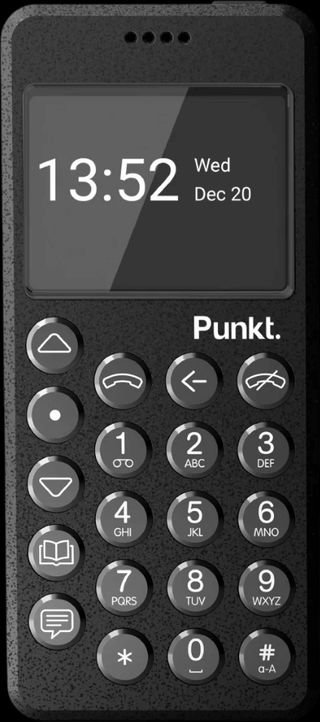
The Punkt MP02 has a loyal niche following. I am not a big fan. The design feels stuck in time. Some people call it beautiful. Others say it looks like a prop from a 90s movie.
The 20-key T9 keyboard is the first thing that stands out. The buttons are round, firm, and clicky. Texting feels slow until you learn the rhythm. You might like that it forces you to type with intention. Others say it is one of the hardest layouts to get used to.
Call quality is good. You get two to three days of battery with normal use. The phone can act as a hotspot, which is its only real bridge to the internet.
It also features a Signal-based Pigeon app. Sounds good in theory but people report lag, crashes, and slow message delivery.
The MP02 is a radical dumb phone. People buy it because it leaves no room for cheating. Parents like this part too. It is a device that keeps you offline whether you want to or not.
Note: this phone does not work with Verizon in the United States.
Mudita Kompakt ($399)
Best E Ink dumb phone
Availability:
Global
Price:
399 USD
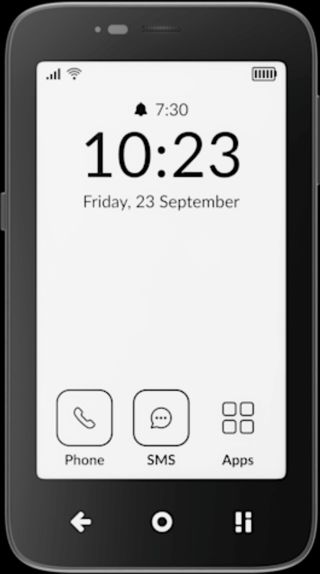
The E Ink screen is the main draw of the Mudita Kompakt. It removes blue light, feels gentle on the eyes, and stays readable outdoors. It also makes the whole phone feel slower, but in a good, intentional way.
The build feels solid. The body has a simple shape that sits well in your hand. I usually get about six days on one charge with light use. Reddit users report three to five days depending on calls and maps.
It comes in three colors: Pebble Gray, Black, and White. I have the white one, and it looks great.
The phone includes offline maps, hotspot, a music app, a simple camera, and small extras like an e-book reader, chess, and a meditation timer. Everything feels intentional.
The dual SIM and eSIM support also help if you travel or keep work and personal separate.
In the US, it works with T-Mobile, AT&T, and some smaller carriers like Mint, Noble Mobile, and Dumbwireless. It works with Verizon too, but only if you already have an active physical Verizon SIM card. In Canada, it works with Rogers and Telus.
There are two versions. Order the North American model if you live in the US or Canada, and the Global version if you live anywhere else.
Out of the box, you do not get Google Maps, WhatsApp, Spotify, or other third-party apps. You can sideload them, but the process is a little technical.
I ended up side-loading WhatsApp, a 2-factor authentication app, Podcast Addict, and a better keyboard (FUTO). I found the default keyboard hard to use and slow.
Some people enjoy tinkering. Others find it annoying. If you want a phone that “just works” with mainstream apps, the Kompakt is not that. This is a device built around stillness first.
Reddit feedback is mostly positive.
People love the screen and the quiet interface. Complaints focus on small bugs, slow animations, and the fact that the OS feels young. Some also note that typing on the E Ink display is slower than on a regular smartphone because of the refresh time.
Sunbeam F1 Pro (from $359)
Best modern flip phone
Availability:
US only
Price:
359 USD
Juniper and Spruce models: 389 USD
Sunbeam makes modern flip phones built for simplicity. They look classic, but the software is thoughtful.
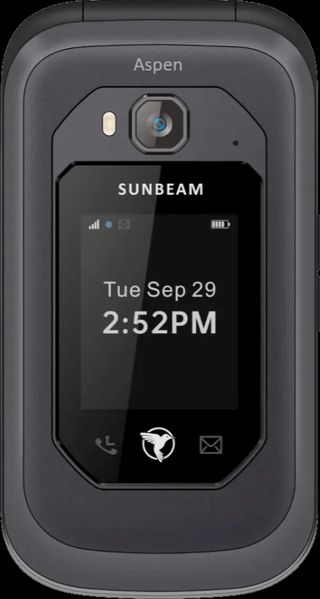
The F1 Pro is their rugged model. It has a strong hinge and a tough shell. It is water resistant and built for drops. People who work outdoors or just want something tough tend to prefer it.
Quick shortcuts on the front of the phone let you send audio messages or toggle the flashlight without opening the phone. These small things matter with a flip phone.
None of the models has a web browser, social media, an app store, or video.
Don’t let the model names confuse you. There are twelve F1 Pro models, each named after a tree. They are all the same phone. The name only tells you which features are switched on.
Here is how to pick yours:
| Model | Get it if you want | Price |
|---|---|---|
| Juniper | Everything: email, Waze, and hotspot | $389 |
| Spruce | Email and Waze, no hotspot | $389 |
| Aspen | Waze and hotspot | $359 |
| Hickory | Waze, no hotspot | $359 |
| Maple | Navigation (no Waze), weather, and hotspot | $359 |
| Cypress | Hotspot, no navigation or weather | $359 |
| Redwood | A classic flip phone with camera and music, nothing more | $359 |
| Birch | Camera and picture messages, no music or touchscreen | $359 |
| Oak | No camera or music, but navigation and weather | $359 |
| Elm | No camera or music, just texts and audio messages | $359 |
| Pine | Calls only, with a camera, touchscreen, and NumberLink | $359 |
| Cedar | Calls only. No camera, touchscreen, or NumberLink | $359 |
Every model except Pine and Cedar can text. One thing to know: Sunbeam phones can’t send or receive RCS messages. If you are in group chats with people who use RCS, they will need to switch the group to MMS, or you won’t get the messages.
Some features need a subscription:
- Premium Services ($3.50/month or $40/year) adds voice to text, plus extended weather and navigation on models that have them. Voice to text works surprisingly well.
- NumberLink ($4.50/month or $50/year) lets you send texts, place calls, and see your contacts from your other devices using the same number. It needs a North American phone number.
- The Service Bundle ($6.50/month or $70/year) includes both.
The biggest downside is the price. At $359 and up, the F1 Pro feels expensive for a flip phone.
Sunbeam also makes the F1 Horizon, a lighter and thinner flip phone. It is out of stock right now, and Sunbeam itself points buyers to the F1 Pro.
Bottom line: If you want a tough, dependable flip phone, the F1 Pro is the one. Get Aspen if you want Waze and a hotspot, Redwood if you want a classic flip phone with a camera and music, and Cedar if you only want to make calls.
Keyphone (from $399)
Best dumb phone with a modular keyboard
Availability:
Ships worldwide
Price:
From 399 USD
QWERTY keyboard: add 35 USD
20MP camera: add 30 USD
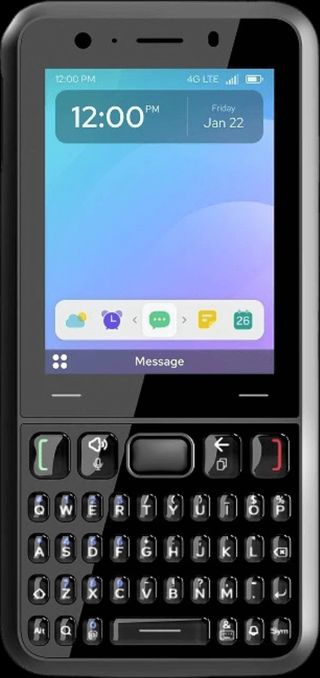
Keyphone is the new kid on the block. It looks like an old-school bar phone with a modular keyboard. The company sells two keypads: one with a numeric keyboard, another with a complete QWERTY keyboard, which costs an additional $35.
The camera snaps off and can be swapped out too, letting you upgrade to a higher quality lens in the future if you wanted to. The phone comes with a 13MP camera, and the 20MP one costs $30 more. It comes in gray and black.
Keyphone is one of the strictest dumbphones out there. There’s no app store, no Instagram, no Facebook, no WhatsApp, and no browser. You can’t add your own apps.
What you get out of the box is what you keep: calls, texts (group texts included), contacts, a calendar, notes, a calculator, and an alarm.
A recent update added the ability to pull up Google Maps through your car’s screen when you connect the phone, so you can still get directions without carrying a maps app around.
It also has a few modern conveniences you might not expect on a phone this strict: eSIM support and tap to pay.
Besides the US, it works on the major carriers in Canada, the UK, most of Europe, and Israel.
The calendar doesn’t sync with Apple or Google Calendar, so it only holds what you type in by hand. And there’s no voice-to-text for quick messages.
If you want a phone with nothing to fiddle with, you will be happy with it. It is boring on purpose, with no rabbit holes to fall into.
AGM M9 ($49)
Best budget dumb phone
Availability:
US version works on T-Mobile and its sub-carriers
Price:
49 USD
Not everyone wants to spend $300 or more to find out if a dumb phone is for them. The AGM M9 costs $49.
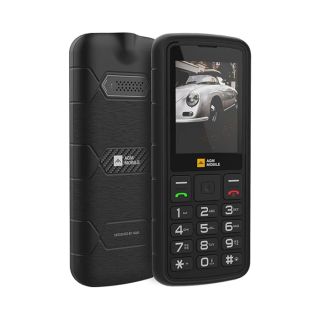
It is the phone on this list that feels most like the one you had before smartphones. A small screen, real buttons, and a battery you can take out.
It does calls and texts. Then there is a calculator, an alarm clock, a camera, a flashlight, and an FM radio. That is about it. No app store. No Wi-Fi. No social media.
It is built to take a beating. It is waterproof, dustproof, and made to survive drops. The keys light up, the text is large, and there is a headphone jack. You can also connect headphones over Bluetooth.
It takes two SIM cards, plus a memory card of up to 128GB for your music.
Owners like the price, the call quality, and how simple it is. The complaints: texting on a number pad is slow, the menus are awkward, and some find the plastic feels cheap. Some owners also report that a link in a text message can open a very basic browser.
In the US, it only works on T-Mobile and on carriers that use T-Mobile’s network, like Noble Mobile and Dumbwireless. There are separate versions for Europe.
Bottom line: Get the AGM M9 if you miss the good old days, want to try a dumb phone without spending much, or want your kid’s first phone to be like yours was.
Dumbphone 2 ($20)
Best companion phone
Availability:
US and Puerto Rico (not Alaska)
Price:
20 USD for the phone
Service plan required, from 15.99 USD/month
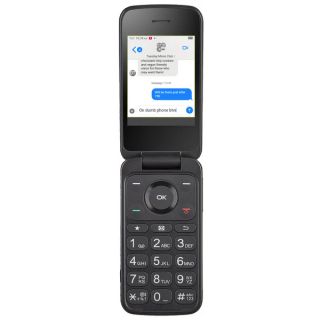
The Dumbphone 2 takes a different approach from every other phone on this list. It is made to sit alongside your smartphone, not replace it.
It is a flip phone from a startup called Dumb.co. Here is the idea. The phone comes with its own SIM card and number. You forward the calls from your smartphone and sync your texts, including iMessage, WhatsApp, and Signal. Then you leave the smartphone at home.
You still get the essentials: Google Maps, Uber, two-factor codes, a camera, weather, and notes. The top plan adds Apple Music, Spotify, and podcasts.
Out of the box, there is no browser and no social media. Technical owners have found ways to install extra apps, but most people won’t go there.
Want to go all in? You can move your main number to it and use it as your only phone.
The catch is the plan. The phone itself is $20, but it only works with Dumb.co’s own service, which runs on T-Mobile’s network. There is a four-month minimum, and you can’t bring your own carrier. Service covers the US and Puerto Rico, but not Alaska.
There are three plans, and the names tell you where this company is coming from:
- Dumbest ($15.99/month): the phone on its own, with its own number. No link to your smartphone.
- Dumber ($20.99/month): adds the companion features. Your contacts, calls, and texts sync from your smartphone.
- Dumb ($25.99/month): everything in Dumber, plus the music and podcast apps.
So the cheapest plan does not include the companion features. If that is why you are buying it, budget for $20.99 a month.
Owner feedback is mixed.
As a second phone, people are happy with it. They like how easy it is to set up, the helpful support, and the steady software updates. One thing to know: iPhone owners say the iPhone has to stay switched on at home for the forwarding to work.
As an only phone, it is less convincing. Some owners report late or missing texts, group chats that break after leaving iMessage, and maps that are hit or miss. Call quality depends on T-Mobile coverage where you live. The battery and camera are nothing special.
One more thing to know before you order: used phones can’t be returned.
Bottom line: The Dumbphone 2 is the easiest way to step away from your smartphone without giving it up. Get it as a second phone for evenings and weekends. If you want one phone that does it all, the Wisephone 2 or the Sunbeam F1 Pro is a safer pick.
Sidephone (from $299)
Best modular phone with WhatsApp
Availability:
Ships internationally and to Canada
Sold out in the US at the time of writing
Price:
from $299 (or €259,00 EUR)
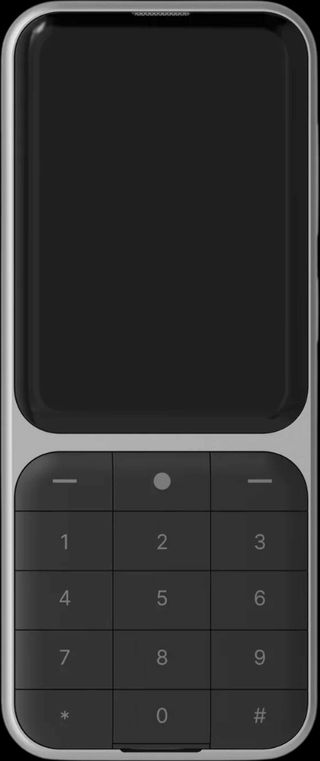
Sidephone is a small, slim device with a replaceable keyboard that attaches magnetically. It is still a young product, but the idea stands out.
You can use it with a standard T9 keyboard, a compact QWERTY keyboard, a sundial keypad (like the old iPods), or even a mini gamepad. The goal is flexibility.
Sidephone has its own small app store called the App Library. You can install WhatsApp, Signal, Google Maps, a browser, or email. If you’re comfortable with sideloading, you can add other Android apps yourself too.
In everyday use, Sidephone can handle the basics: calling, texting, using simple maps, checking email, browsing the web, taking photos, listening to music, and keeping notes or reminders, plus whatever else you choose to add from the App Library.
But it’s not a full replacement for an iPhone or Android.
The 2.8-inch touchscreen is small, so not every app looks great on it. There is a 13MP camera on the back and no selfie camera. And because it skips Google’s services under the hood, a few things, like mobile banking apps or Android Auto, don’t work well or at all.
Sidephone needs a physical SIM card. In the US, it only works on T-Mobile and on carriers that use T-Mobile’s towers.
It was designed to act as a focused second phone rather than your only device. That matches how owners use it. Many keep a smartphone around for banking, two-factor codes, travel, or work.
I personally haven’t tried it yet, so I looked at what owners say. The feedback is mixed.
People like the size, the look, and typing on real keys. The compact QWERTY keyboard gets the most praise. Some owners also say they scroll less and put the phone down sooner.
The complaints are mostly about polish. Early units had keyboard bugs: keys that did not respond, dropped connections, wrong characters. Software updates fixed several of these, but not everyone is in the clear.
Group texts and picture messages are another weak spot. Some owners use a third-party messaging app to get around it.
Battery reports go both ways. Some people get several days. Others see it drain fast.
A couple of smaller things: the keypads are not backlit, and setting the phone up takes some tinkering.
Bottom line: Sidephone is a fun, flexible second phone for people who do not mind tinkering. If you want something that just works as your only phone, the Wisephone 2 or the Balance Phone is a safer pick.
What you can try next
A dumb phone helps you step back from your screen, but it is only one way to reset your habits. If you want something you can start today with your current phone, read How to Stop Scrolling: 8 Secrets That Actually Work.
This guide covers tools like NFC tags, lock boxes, and other simple tricks that make it easier to stay off your phone without buying new hardware.
Or consider dumbing down your iPhone.